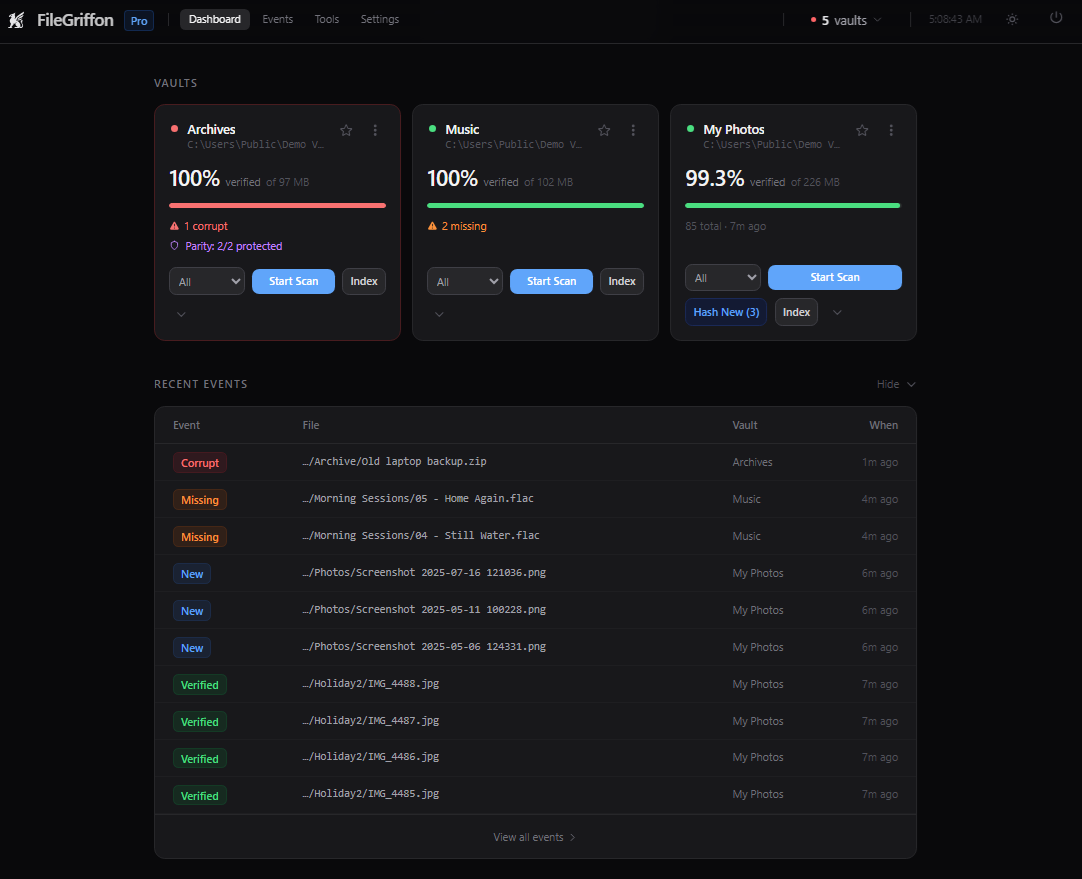
The dashboard: each vault's verified percentage, problems found, and recent events.
An app that runs quietly in the background — verifying your files with cryptographic hashing, repairing damage with parity data, catching duplicates, and watching your drives' health — and more.
Download freeNeed more? Try Pro free for 14 days, straight from the app — or see pricing.
Follow progress on the blog, or sign up for updates.
The dashboard: each vault's verified percentage, problems found, and recent events.

FileGriffon is a background daemon that watches a drive or folder (a "vault") and cryptographically verifies your files over time. It flags corruption, missing files, and moved or renamed files, and can repair certain damage using parity data. Everything runs locally — no cloud upload.
The idea: storage prices make "just buy a second drive and mirror it" a harder sell than it used to be. FileGriffon hardens the single drive you already have, at a fraction of the cost of buying redundant storage.
Add a folder or NAS share as a "vault," or a whole drive with Pro. No special formatting or preparation needed.
Every file gets hashed and rechecked automatically in the background, on whatever cadence you set.
Corruption, missing files, and moved or renamed files show up on the dashboard as soon as they're found — not whenever you next open the file.
From adding a folder to repairing a damaged file. Click a screenshot to enlarge.
No fine print required to answer the two questions that actually matter: where does your data go, and what does FileGriffon do to it.
Upload your files to the cloud
Scanning, hashing, and the database all run on your machine. No file, filename, or folder structure ever leaves it. How we handle your data →
Encrypt your files
FileGriffon isn't an encryption tool. The only thing it can encrypt is its own local database, for your protection, never your files. Security & encryption docs →
Move or delete your files
Not on its own. A repair or restore sets the damaged original aside next to the fixed file instead of deleting it, and you delete that copy only if you choose to, after a confirmation. The only things FileGriffon removes on its own are its own byproducts, like PAR2 recovery data, identified by exact internal naming, not by touching anything you own. How parity protection works →
Track what you do with your data
Nothing about your files, vaults, or activity is ever sent. A daily license check-in carries a one-way, hashed machine fingerprint, the FileGriffon version and your operating system family. Usage telemetry is separate, off by default, and only sends anonymized counts if you opt in yourself. Licensing details →
Helps you organize your files
The built-in Duplicate Finder surfaces exact copies sitting in your vault, with more organization tools planned. Duplicate Finder docs →
Helps you use your drives more efficiently
FileGriffon never compresses or changes your data, it just helps you trust the storage you already have instead of buying more as insurance.
Protects your files
Parity data lets you repair certain corruption from the dashboard, and silent degradation gets flagged the moment a scan catches it, not whenever you next happen to open the file. Parity protection docs →
Shows you your storage devices' health
Drive Info (Pro) reads SMART data straight from the hardware, so you can spot a drive that is starting to fail. Drive Info docs →
Full breakdown with specifics: FileGriffon's approach to privacy and data handling
The free tier isn't a countdown or a crippled demo. One vault, any size, for as long as you like.
Pro adds unlimited vaults, whole-drive vaults, email & ntfy alerts, SMART drive health monitoring, and the full PAR2 redundancy tiers.A 14-day trial is built into the app— no card, no account, start it from Settings whenever you want.
Built for people who can't afford to lose a single file
November 5, 2026
bitrotlab is a small lab for file corruption, built by the developer of FileGriffon. Its first bench shows parity repair rebuilding the missing pieces of a picture in your browser.
October 28, 2026
FileGriffon 1.3.0 gives the dashboard its own window on Windows, with performance and security benefits, lets you pin it to the taskbar, and adds a broad set of performance and stability improvements.
October 9, 2026
What FileGriffon's database actually contains, when encrypting it is worth the trade-off, and the two situations where enabling it is a bad idea.
Leave your email for release updates and the occasional product news.